Path Finder alternative for Mac: who should switch, who should stay
Who Path Finder suits, who might want a file manager closer to Finder, a sourced comparison table, and when Path Finder is still the better choice.
In short
- Path Finder: one window with everything, from dual panes and modules to a terminal, folder compare and a duplicate finder.
- FileOctopus: works like Finder, nothing to relearn, plus panes and fast filename search.
- Servers and sync first: ForkLift 4 or Commander One.
Disclosure: FileOctopus is our app. Path Finder facts come from Cocoatech's update notes, Setapp and a dated TidBITS article, linked below and checked 9 November 2026. Prices change, so we name the pricing model only.
- Modules, terminal, archives, everything in one window
 Path Finder
- Servers and sync above all
 ForkLift 4
 Commander One
- Works like Finder, plus panes and fast search
 FileOctopus
Who is Path Finder great for?
Best for people who build their own workspace out of parts.
By Cocoatech, "based on the unique modular system" (Setapp). Version 26 (TidBITS, 10 May 2026) added full-height shelves, a folder compare operation and 20 languages. The update notes for 26.1.10 mention macOS 27 fixes.
Good at (Setapp)
- Dual-pane view
- Folder compare and sync
- A temporary Drop Stack for collecting files
Also in the update notes
- Rewritten terminal, as a module or window
- Duplicate finder for selected folders
- Batch rename built from draggable steps
- Password-protected ZIP archives
- Size browser, hex editor, Git and Subversion modules
Who might want something else?
- You want Finder's look and keys. Modules and shelves are a different way of working; an app with Finder's views and shortcuts asks you to learn less.
- You prefer a one-time purchase. Path Finder is a yearly subscription, a 1, 2 or 5-year license (TidBITS, May 2026) or part of Setapp. Version 26 was a paid upgrade (update notes).
- You need servers and sync, or a free app. See ForkLift 4, Commander One and the free, open-source Nimble Commander in our best Finder alternatives (checked 4 November 2026).
Path Finder and FileOctopus compared
| What you choose on | Path Finder | FileOctopus |
|---|---|---|
| Browsing | ||
| Layout | Yes: Dual pane, tabs, modules, full-height shelves | Yes: Finder's views; 2 panes Free, 16 PRO; pane tabs; workspaces (PRO) |
| Search | Yes: Spotlight mode and own FileSearch mode | Yes: Own name index plus Spotlight; text in documents and screenshots opt-in (PRO) |
| Servers and cloud | Partly: Uploader for Dropbox, SFTP/FTP, S3, Backblaze | PRO: Browse SFTP (beta), WebDAV, S3-compatible in a pane |
| Tools | ||
| Archives | Yes: ZIP with password; expands TAR, PAX | Partly: Compress to ZIP |
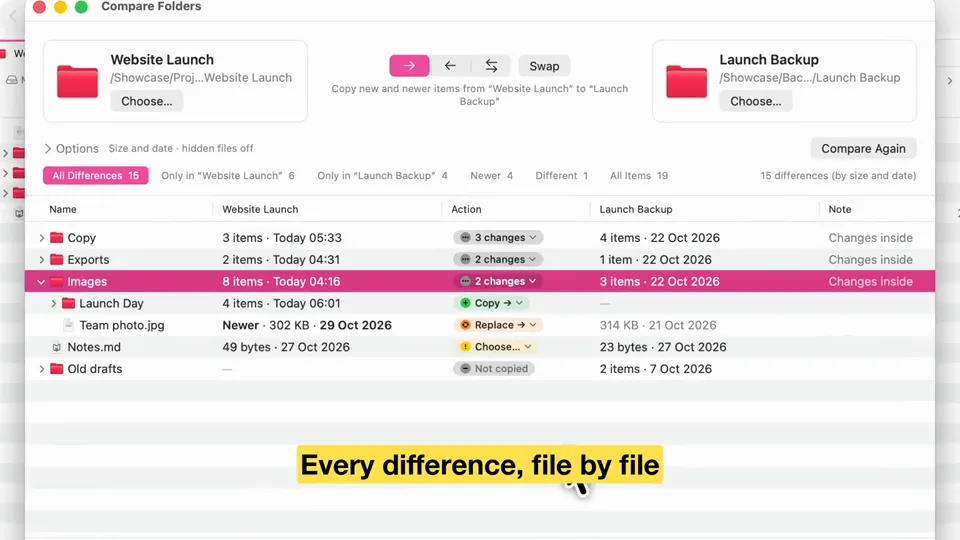
| Compare two folders | Yes: Compare and sync | PRO: beta |
| Find duplicates | Yes | Yes: Scan Free; move copies to the Trash PRO |
| Terminal | Yes: Module or window | No |
| Requirements and price | ||
| Oldest macOS | 13.0 (Setapp) | 15.0 |
| Intel Macs | Not stated: not stated for the current version | No: Apple Silicon only |
| Price model | Yearly, or 1, 2 or 5-year license (TidBITS); Setapp | Free plan; PRO one-time, 14-day trial |
| Latest version | 26.1.10 (no date stated) | 1.1.0, 8 November 2026 |
has it partly no not stated in PRO. Path Finder cells: store.cocoatech.io/updates, Setapp and TidBITS (10 May 2026), checked 9 November 2026. Its servers cell is the Cloud Folder Uploader (Setapp); the Google Drive uploader was removed (update notes). FileOctopus also shows iCloud Drive, Google Drive and Dropbox folders through their own apps. Cocoatech's home page didn't load for us. Setapp lists 19 languages; Cocoatech and TidBITS say 20.
When Path Finder is the better choice
Stay with Path Finder, or pick it, if:
- You use a terminal next to your files. FileOctopus has none.
- You open archives often. FileOctopus only compresses to ZIP; it doesn't extract other types itself.
- You run an Intel Mac or macOS before 15. Setapp lists macOS 13 for Path Finder.
- You already pay for Setapp. Path Finder is included, so trying it costs nothing extra.
- You like building the window yourself. FileOctopus has nothing like modules for previews, Git, sizes and a hex editor.
What FileOctopus does differently
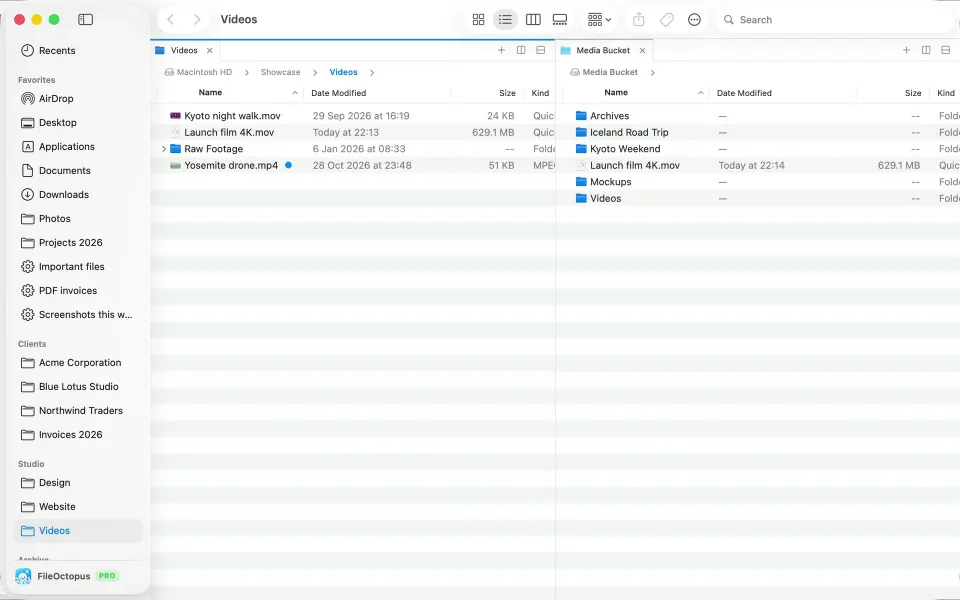
Works like Finder, nothing to relearn: same views, sidebar, Quick Look and shortcuts, plus panes, search that answers as you type and safer file operations.
Good at
Keep in mind
- Batch rename has no regular expressions
- No built-in terminal
- SFTP servers and Compare Folders are still betas; the limits page lists what it doesn't do yet
Switching from Path Finder
- Your files stay put; neither app moves files on install or removal.
- Drag favourite folders into the sidebar's Favorites, as in Finder.
- View ▸ Pane Layout ▸ Side by Side gives two panes; Window ▸ Save Workspace… keeps it (PRO).
- Add folders you search often in FileOctopus ▸ Settings… ▸ Search to index their names.
Both run next to Finder, so you can try FileOctopus without removing Path Finder.
Questions people ask
Is Path Finder discontinued?
No. Path Finder 26 came out in May 2026 (TidBITS), and the update notes list 26.1.10 with macOS 27 fixes. Lists calling it discontinued are out of date.
Is there a free alternative to Path Finder?
Nimble Commander is free and open source, per its site (checked 4 November 2026, alternatives list). FileOctopus Free has no time limit: two panes, file operations with Undo, batch rename and filename search.
Is there a Path Finder alternative without a subscription?
Yes. FileOctopus PRO is one-time (pricing), and on 4 November 2026 so were ForkLift 4, Commander One and QSpace Pro (comparison table).
Does FileOctopus replace Finder?
No app can remove Finder; macOS uses it for the Desktop and more. FileOctopus runs next to it (FileOctopus vs Finder).
Like Finder but want panes and faster search? Download FileOctopus; the Free plan has no time limit.
Sources
Checked on 9 November 2026: Path Finder update notes (Cocoatech), Path Finder on Setapp, TidBITS, Path Finder 26 (10 May 2026). FileOctopus facts are from our guide and limits page.
App icons come from their makers' sites (cocoatech.io for Path Finder) or Mac App Store listings, and belong to their makers. We found no current official Path Finder screenshot, so we show only its icon. Spotted a mistake? Write to support@fileoctopus.com and we'll correct it.