Press kit
Writing about FileOctopus?
Facts, numbers with their sources, screenshots and clips you can use in an article, a list or a video. Everything here shows fictional files.
In one sentence
FileOctopus is a native file manager for Mac that keeps Finder’s views, shortcuts and Quick Look, and adds split panes, saved workspaces, fast filename search and safer file operations.
It is made by one developer, Max Luong, in Vietnam. It doesn’t replace or change Finder: both run side by side, and Finder stays the system default unless you choose otherwise.
Fact sheet
- Developer
- Max Luong, solo indie developer, Vietnam
- First public release
- 22 October 2026
- Current version
- 1.0.9 (changelog)
- Requires
- macOS 15 Sequoia or later, Apple Silicon
- Built with
- Swift and AppKit, no Electron
- Download
- 12 MB disk image, signed with a Developer ID and notarized by Apple (download from the home page); also on Homebrew:
brew install --cask nghialuong/fileoctopus/fileoctopus - Distribution
- Outside the Mac App Store, because the App Store sandbox limits what a file manager can do
- Account
- None. No sign-in, no cloud service of its own
- Plans
- Free forever, or a one-time PRO purchase with no automatic renewal. Every PRO feature is free to try for 14 days, with no card. Current prices: pricing
What it does
- Finder you already know. Icon, List, Column and Gallery views, Quick Look, tabs, tags and Finder’s keyboard shortcuts.
- Split panes and workspaces. Two panes per window on Free and up to 16 with PRO; copy or move to the other pane; save a layout of folders as a named workspace.
- Fast search. A local filename index with fuzzy matching, plain-language queries such as “PDFs from last week”, and opt-in search inside documents and text in images.
- Safer file operations. Conflict choices before anything is replaced, folder Merge with a preview, Pause and Resume, verified moves between drives, and Undo that also works after you quit.
- The Shelf, Quick Open and the Command Palette for collecting files and getting anywhere from the keyboard.
- Compare Folders (beta), plus Google Drive, Dropbox and iCloud Drive folders through their own desktop apps.
What it doesn’t do yet is listed on Current limits. Please check there before you write that something is missing or broken; if it isn’t listed, tell us.
Free and PRO
| Free | PRO (and the 14-day trial) |
|---|---|
| Browsing in all four views, Quick Look, tabs and windows | Everything in Free |
| File operations with Undo, folder Merge and the Problems list | Up to 16 panes per window |
| Quick Open, the Command Palette and batch rename | Named workspaces and saved searches |
| Filename and Spotlight search | The Shelf, and queueing copies and moves |
| Up to 2 panes per window | Compare Folders, and search inside documents and images |
Prices change with launch offers, so please link to the pricing section rather than quoting a number.
Numbers you can quote
Please name the Mac next to a speed number. The method, scripts and raw results are in the search benchmark.
- Search results about 20× sooner than Finder’s default search on a Mac mini M4: 0.52 s against 10.2 s, median of 12 searches over 146,190 files, macOS 27.0.
- About 10× sooner than Finder searching names only, same Mac mini M4 run: 0.52 s against 5.0 s.
- 29× faster on a MacBook Pro M3 Max: 0.27 s against 7.7 s, Finder’s default ⌘F search (names and contents), macOS 26.5.1.
- First results appear at about the same time in both apps (about 0.3 s). The difference is how long until the list is complete.
- 12 MB download for version 1.0.9.
Privacy in short
- No account. The search index, saved searches and workspaces stay on the Mac.
- Usage statistics and crash reports are two separate choices, both off unless you turn them on. Neither ever includes file names, paths, search text or file contents.
- Otherwise the app goes online only to check for updates (it asks before turning automatic checks on) and to activate or check a PRO license.
- No AI service sees your files. Plain-language search runs on the Mac.
Details, including every event and where it goes: Privacy settings and the Privacy Policy.
Screenshots and clips
Free to use in coverage of FileOctopus. All of them were recorded in FileOctopus with fictional files. Please don’t change the icon’s shape or colours.

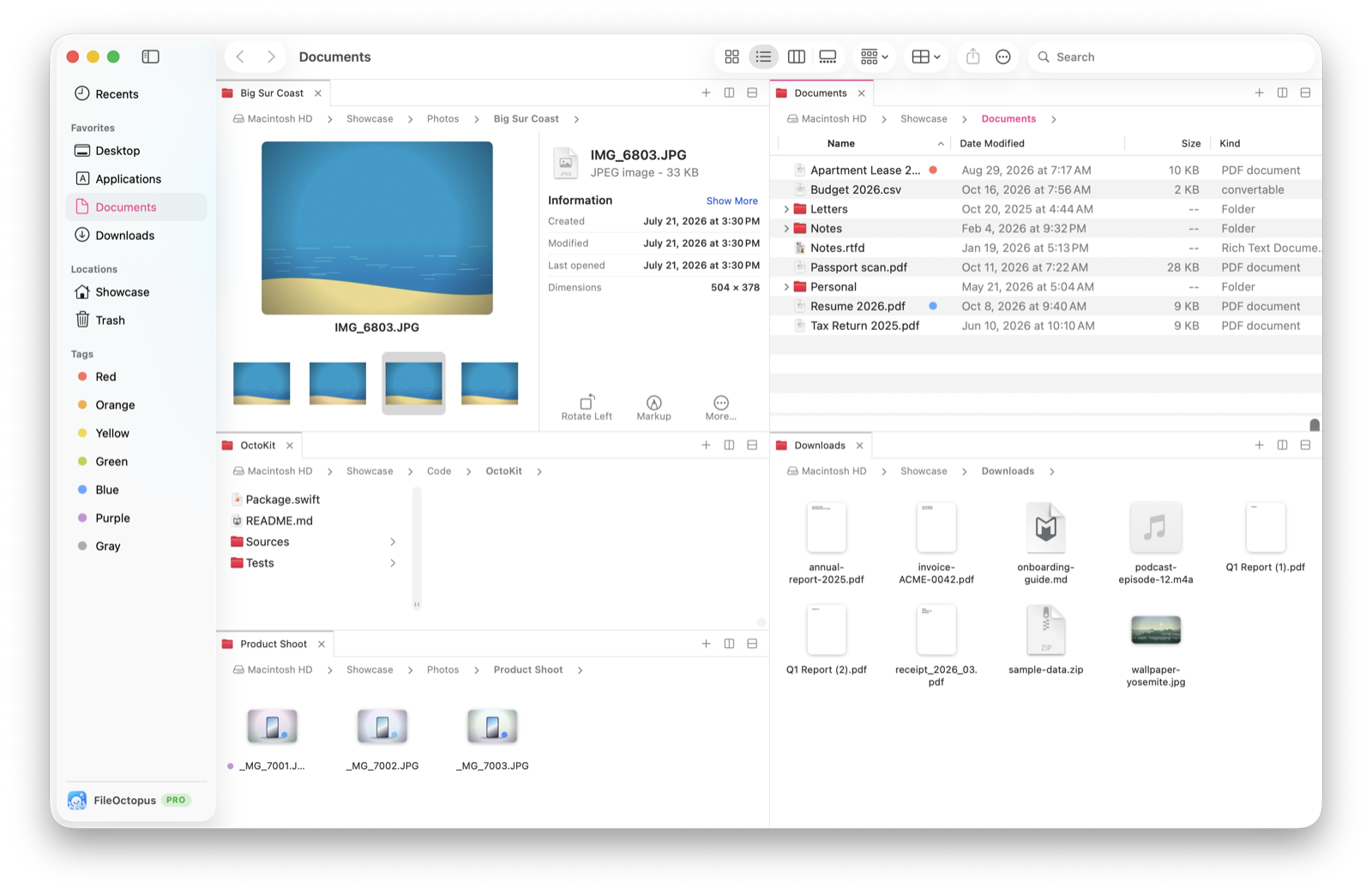
The full product film is on the home page. More short clips, one feature each, are on Tips.
Review licenses
If you write about Mac apps or make videos about them, email support@fileoctopus.com from your publication’s or channel’s address and I’ll send a PRO license. There are no conditions on what you say, and you don’t need to send me anything before it goes out.
Contact
Max Luong: support@fileoctopus.com, @_nghialuong on X, or the FileOctopus Discord.